Hey everyone, day 9 of hunt for devops
What is TCP?? What is HTTP?
Network fundamentals https://www.youtube.com/watch?v=fQbBPa0ADvs
Seems a little too low level for me, I’ll be pulling from these sources: TCP/IP https://www.youtube.com/watch?v=aD_yi5VjF78
HTTP/HTML https://www.youtube.com/watch?v=1K64fWX5z4U
What Is a Computer Network?
In a Computer Network (for example the Internet):
There is telecommunication framework which allows digital devices or nodes to interact, it can be wired or wireless.
The interaction is to share resources which could be hardware or software
These digital devices interact and share data, which is data communication
Data Communication
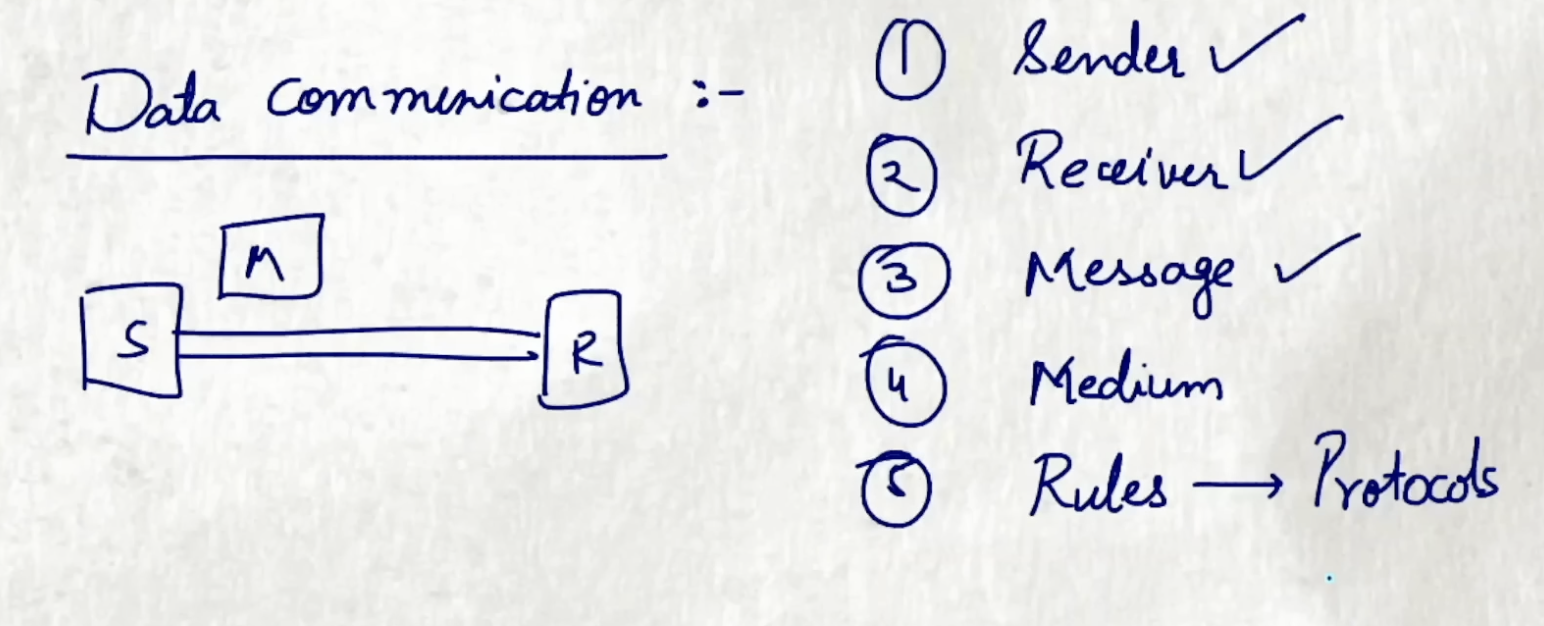
- Sender
- Receiver
- Message
- Transmission Medium
- Rules / Protocols (to do something that is already agreed upon) so that the internet can communicate connect and collaborate
Information goes from one computer to another through a packet of information
The packet travels from one place to another similar to how you’d get to a place through a car.
There may be traffic congestion or conditions by which road you choose, you may be forced take a different route to get to the same place each time you travel
Similar to what you’d transport through a car, you can send digital information through IP packets, such as music, e-books, videos.
The analogy they use in the video is if you need to bring a space shuttle to a launch site, you’d break it into parts, into a fleet of trucks of which they’d take routes to get to the launch pad.
If you have a large image you want to send to someone, that image may be made up of tens and millions bits of 1s and 0s, which is too many bits for one packet.
The computer breaks it into packets. Each packet has the Internet address of where it came from and where it is going unlike how the truck has a a driver and a route.
Special computers called routers act like traffic managers to keep the packets moving smoothly.
If one route is congested they may take another route and arrive at the destination at different times or out of order at times.
Internet Protocol (IP)
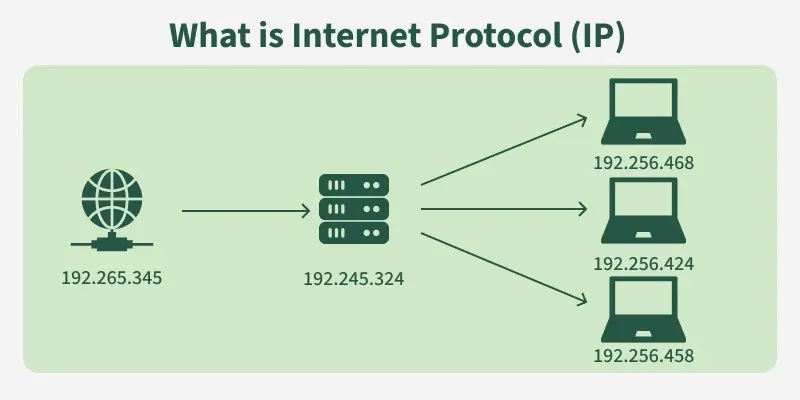
Routers keep track of multiple paths and chooses the cheapest available path based on destination address for the packet.
Cheap means the time, politics / relationship among different companies.
Having options for paths means it’s fault tolerant, meaning the network can keep sending packets even if something goes wrong. This is for reliability
TCP: Transmission Control Protocol
How can we be sure the data is delivered successfully? TCP Transmission Control Protocol
Managing the sending and receiving of all your data in packets, similar to a guaranteed mail service.
When you request a song from Spotify, the song is sent as packets, and TCP does an inventory on all the packets and sends acknowledgements (ACK) on every packet received.
The full system is SYN or synchronize, requesting a connection, SYN-ACK acknowledging connection, ACK sender confirms connection.
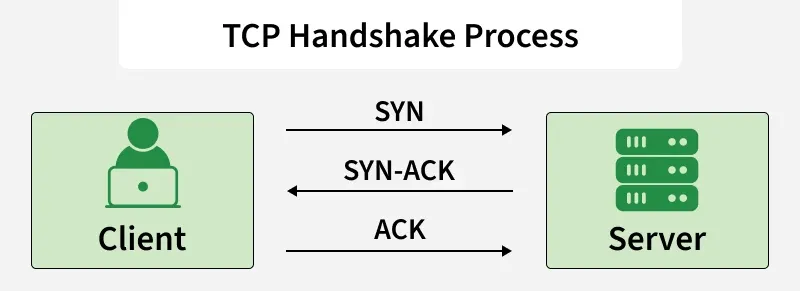
TCP signs for your delivery.
If all the packets aren’t there the TCP won’t sign because the image may not sound as good without all the packets.
For each missing / incomplete packet, Spotify will resend them
TCP + router systems are scalable
This means that adding more routers will make the system more reliable due to the fault tolerance nature of this system, which means we can scale the internet without interrupting service for anyone using it.
What Is HTTP?
What is HTTP?

Web Browser -> URL (uniform resource locator) -> Spotify.com
Your computer communicates with a web server, to get a URL, and the server communicates back in a language called HTTP (hypertext transfer protocol)
The communication is mostly made up of GET requests which is pretty much GET and the name of the document you’re requesting.
If you’re trying to login to YouTube you’re sending a get request saying GET /login, which tells Youtube’s server you want all of the HTML code for the YouTube login page
HTML and GET Requests

HTML - hypertext markup language, telling a web browser how to make a web page look
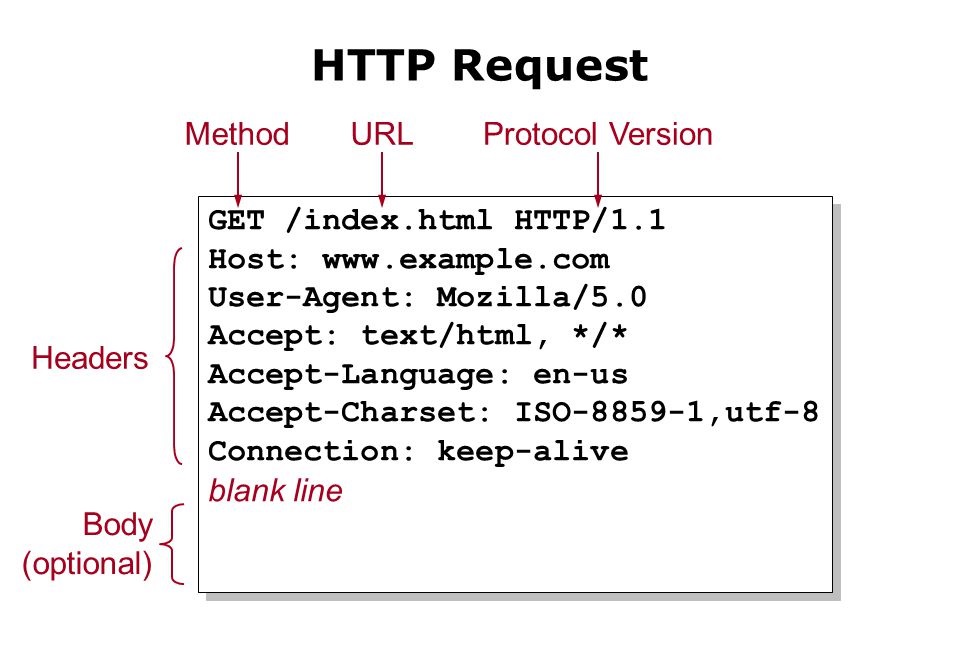
Images and videos on that web page are separate files which the browser sends separate GET requests like GET /image GET /video HTTP requests and displays these images as they arrive
If web page has a lot of images each of them uses a HTTP request making the web page loads slower
POST Requests and Cookies
Sometimes you send information, like when filling out a form to sign up for a newsletter, or type a search query.
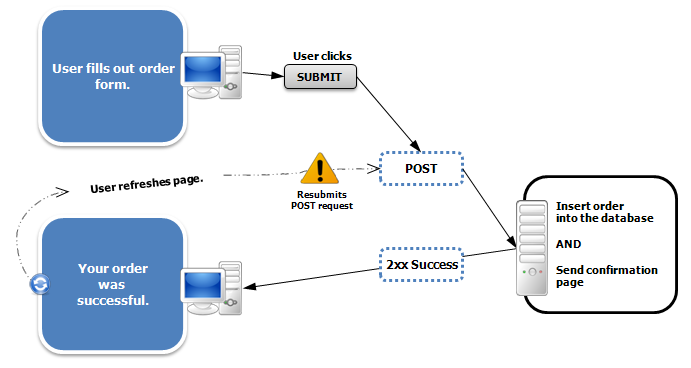
The browser can also send a POST request POST /search
When you login to Spotify, you send a POST request of your email and password, sending it to Spotify’s server and sends a web page back as successful login based off the user, it attaches cookie data to the browser so the website can remember who you are
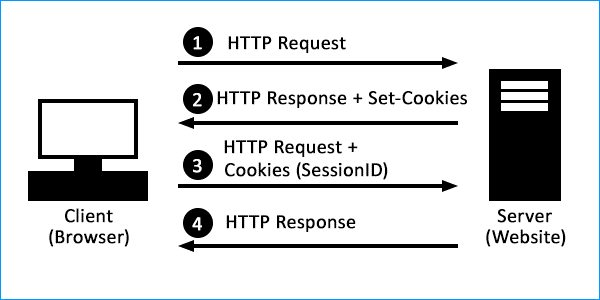
The cookie is an ID card which identifies you as the user you logged in as. So the browser attaches the cookie when going to the url and the server knows it’s you
SSL, TLS, and HTTPS
The internet is open, connections are shared, and information is sent in plain text, which is prime time for hackers
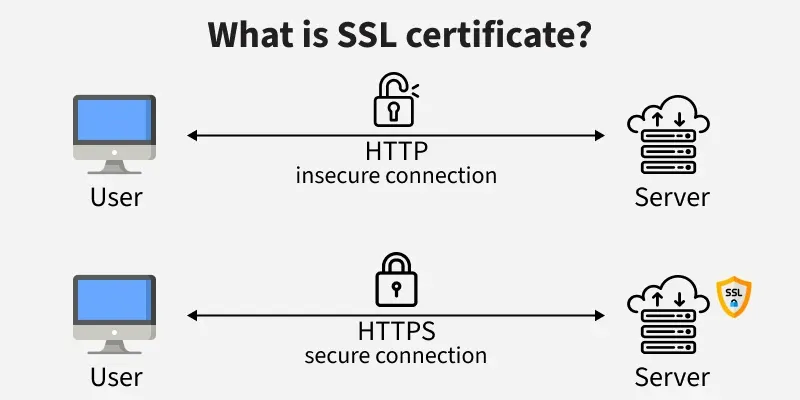
To combat this, browsers use SSL or secure sockets layer and its successor TLS transport layer security, preventing snooping and tampering from hackers
This is a layered security around your communications and is shown with the lock next to https (hyper text transfer protocol secure)
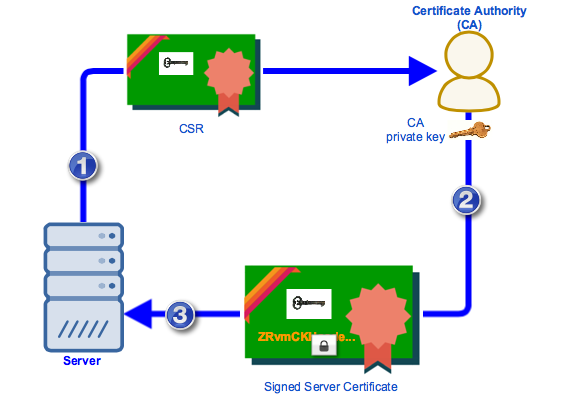
When the website asks browser for secure connections, the website gives a digital certificate showing that the website is what it claims to be.
This certificate is given through the certificate authorities, which are trusted entities that verify identities of websites and issues certificates for them.
If a website tries to secure a connection without a digital certificate your browser will warn you
HTTPS and DNS manage the sending and receiving of web files, what makes this possible is TCP / IP routing breaking down and transporting information in packets. Those packets are binaries, sent through electric wires, fiber optic cables, and wireless networks.
I really love this format where I explain low level stuff, so we can understand high-level stuff. We need to understand http requests, and TCP to know how Docker’s virtualization works in its networking layer. I plan to write a blog post about API Gateway, REST API, and maybe even an API. I plan to have this dev journal have everything I’m unsure of.
As you saw in the beginning, I was almost sucked into extremely low level understanding of networking, but I don’t really understand pure definitions, nor do I want to spout out a pure definition in interviews or the workplace like chatgpt.
I’d rather understand things as a story, as I understand what serverless is, and now as I understand what HTTP and TCP / IP is.