Hey everyone, so I’m going to start reading books because I’m a bit bored.
One thing to note, the other day, my interview mentioned they wanted me to be a jack of all trades master of none. Of course, they were paying me enough to say that, but honestly, that’s a really easy way to not be strong in today’s tech market. You must be strong in a singular field, specialists will always beat out generalists, even that Sr Software Engineer I met, unless he is a stakeholder, is shooting himself in the foot for being weaker than the average Jr Software Engineer if he doesn’t specialize in the Frontend, Backend, Devops or something.
Tony Gaddis - Starting out with Java
“Without programmers, the users of computers would have no software, and without software, computers would not be able to do anything.”
To first learn about software we should probably learn hardware.
Computer Organization and its systems.
There’s the CPU, which we have the control unit and arithmetic logic unit, which does mathematical calculations.
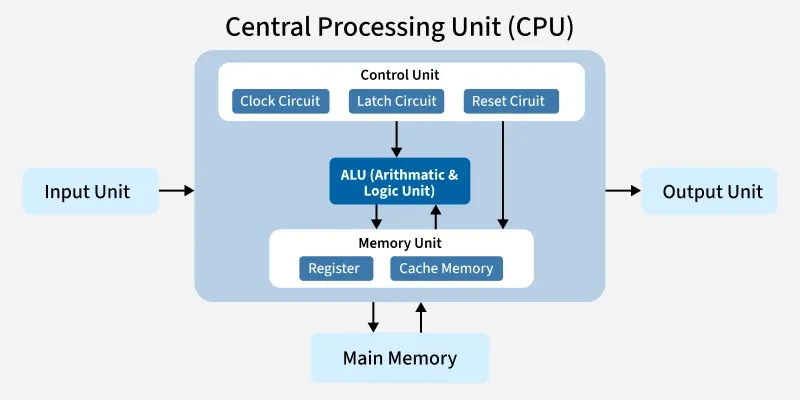
The fetch execute cycle https://www.youtube.com/watch?v=Z5JC9Ve1sfI
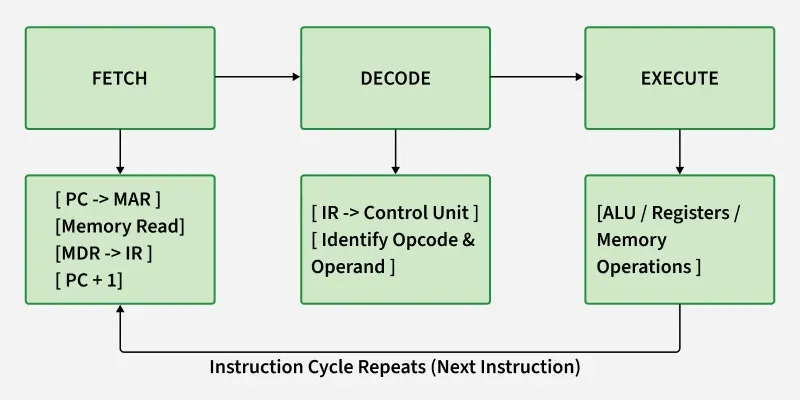
Kind of reminds me of CS 370 Computer Architecture class I took at SDSU
There is CPU and RAM, and for fetch, decode, execute is looped recursively through addresses in ram to carry out instructions
This loop can do a simple thing as a for loop
Higher level languages were created as a form of abstraction for this loop
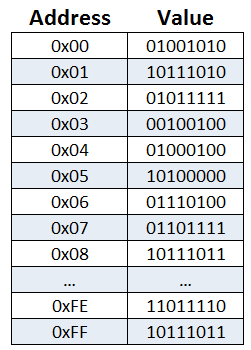
RAM or main memory has a series of 8 addresses, of bits which are either 0 or 1, which is off or on. Each of these sections is a byte
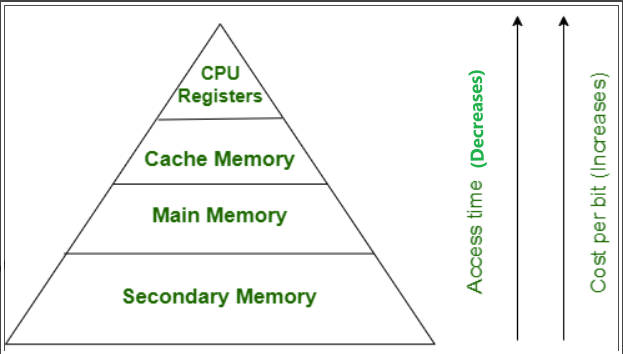
Secondary memory is known as a long-term memory, for when the computer is turned off the information is not erased.
Input devices are anything that the computer collects from the outside world, stored in main memory, such as a mouse or a keyboard.
Output devices are anything that the computer sends to the outside world such as a USB drive
Two softwares, OS and Application Systems
Operating Systems are pretty much the hardware running and the processes on the computer
Application Software are what make the computer useful, like Microsoft Excel
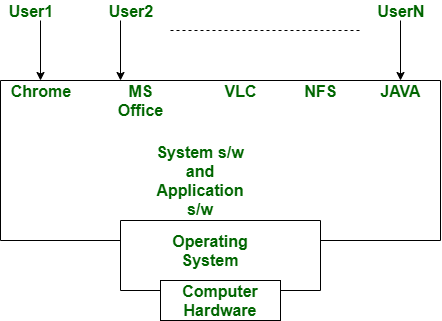
Why is the computer used by so many different people, in so many different professions?
Because Software is what makes a computer useful, you have people using computers as a mechanic, to see the parts of a car and troubleshoot, or an accountant, using the software to record invoices, or even a medical professional, logging sensitive user data.
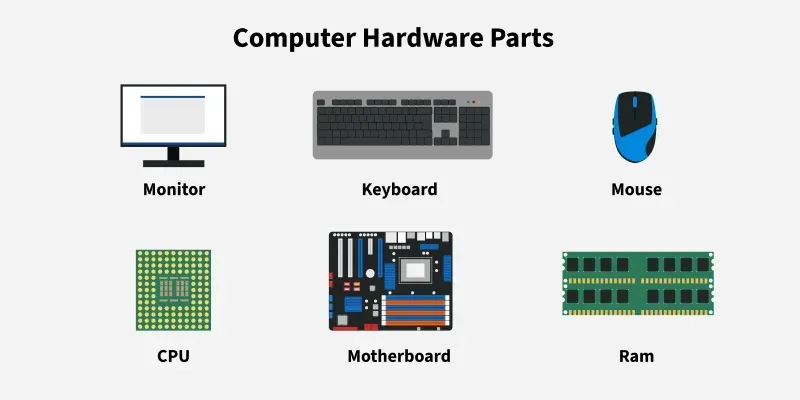
1.2 List the five major hardware components of a computer system.
There is the CPU, RAM, input devices, output devices, and secondary storage devices
1.3 Internally, the CPU consists of what two units?
The control unit and arithmetic logic unit (ALU)
1.4 Describe the steps in the fetch/decode/execute cycle.
The computer runs fetch, grabbing the address with the instruction on the RAM, then decode, reading the instruction on RAM, then execute, executing that instruction on RAM
1.5 What is a memory address? What is its purpose?
A memory address is used to store instructions or information, it is a section of memory in RAM which is called a byte.
1.6 Explain why computers have both main memory and secondary storage.
RAM or main memory is used for operations can be erased when the computer is turned off. The secondary memory can store information even when the computer is turned off, but is slower to access because it is not directly accessible by the CPU like RAM.
1.7 What does the term multitasking mean?
When an Operating System can run multiple programs at once such as Linux, MacOS, or Windows.