Hey everyone, day 5 of hunt for devops.
The Plan
I want to now containerize a multi-service app with CI/CD. Take a simple app (frontend + API + Postgres), dockerize each service, orchestrate with Docker Compose, then wire up GitHub Actions to build, test, and push images on every commit. Teaches containers, pipelines, and env management.
I’m really interested in Kubernetes, but maybe later.
Ok, let’s start building.
I asked Claude Code:
I want to containerize this multi-service app with CI/CD, where the frontend, api, Postgres, and dockerize each service, orchestrate with docker compose, then wire up GitHub Actions to build, test, and push images on every commit. Write a plan for this.
Two videos to get grounded before actually building any of it:
- Containers: https://www.youtube.com/watch?v=0qotVMX-J5s
- CI/CD pipelines: https://www.youtube.com/watch?v=R8_veQiYBjI
So we want to push this simple app to deployment. Let’s look at containerization.
VMs vs. Containers
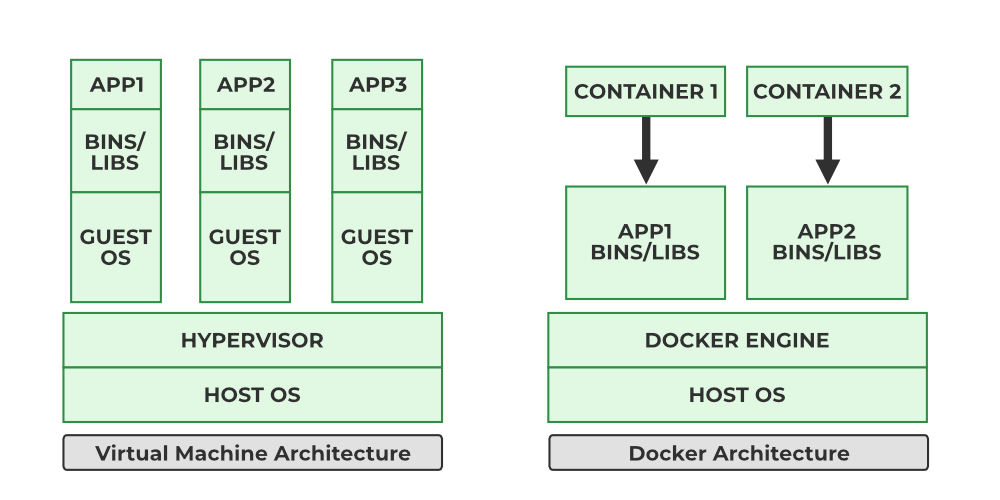
We can do this two ways. Let’s start with VMs. A VM has the hardware, the host operating system, and the hypervisor, and it consumes real resources to run.
We push the simple app into the VM, which means we need a Linux virtual machine. This contains the guest OS plus some binaries, which introduces bloat on resources.
Then we scale the app, making 2 different copies of it. Each copy needs its own guest OS and libraries deployed separately, and that’s what causes drift.
The app is developed on a MacBook, and when it’s pushed into the VM, we run into issues and incompatibilities. The famous line: it works on my machine. Huge problem for agile/devops work.
This is what containers solve.
From Dockerfile to Registry
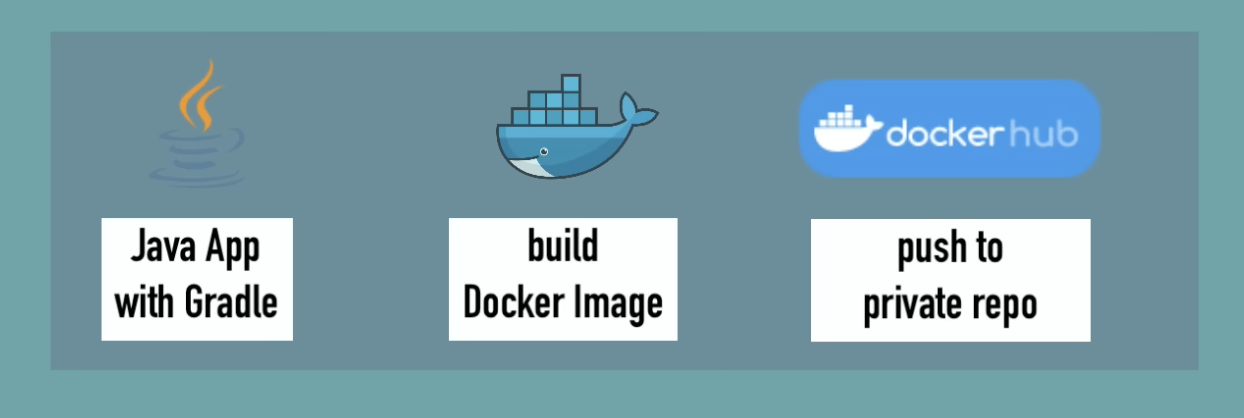
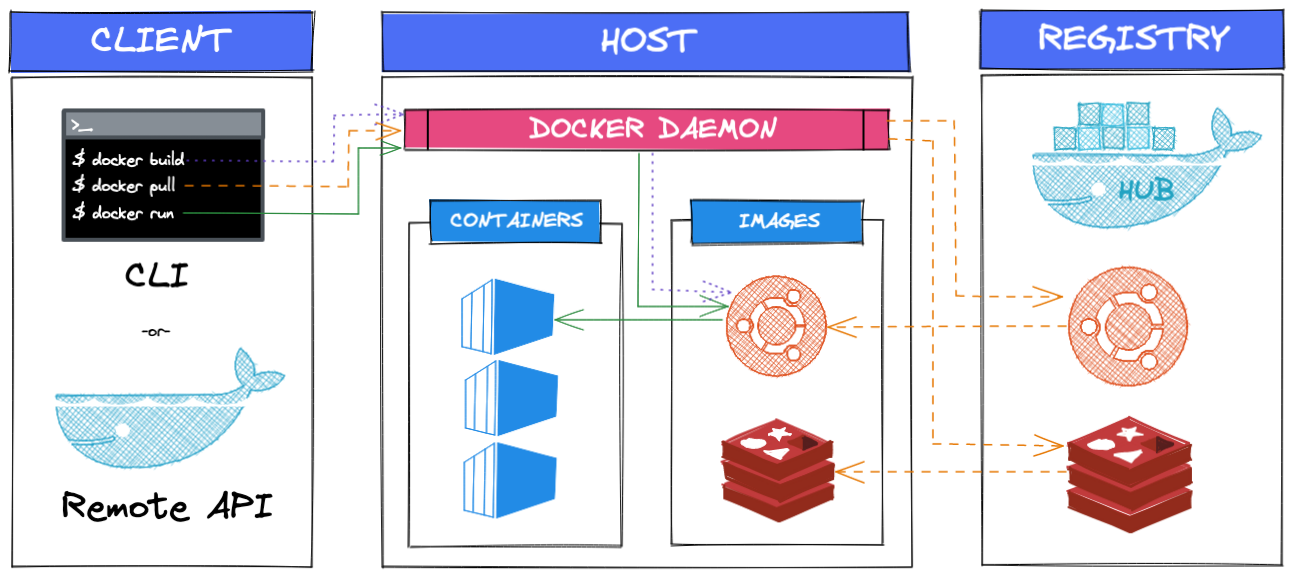
We start with a manifest that describes the container itself, which is a Dockerfile. That builds a Docker image. The image, when run, becomes a container, which contains all the runtimes and libraries needed to run the application. It’s the same basic setup as the VM, just packaged differently. We push this container to a registry, kind of how you push code to a GitHub repo.
The container runs on a host OS through a runtime engine, the Docker engine, instead of needing its own full guest OS.
Containers are lightweight: the app and its libraries live in each container, which uses way less resources than running multiple copies of an app across separate VMs.
Containers Are Modular, VMs Are Not
Let’s say I want to add a third-party Python app, an AI error checker, alongside my image captioning project. With VMs, that’s not ideal, since VMs are so resource-intensive that I’d basically have to kill one VM and spin up a new one just to fit the new app in.
We could add both applications into a single VM, but that wouldn’t be cloud native, since we can’t scale out the image captioning app without also scaling the AI error checking app.
To do it a cloud native way with VMs, we’d create a whole new VM just for the AI checker app, which is resource heavy.
With a container based approach, since it’s modular, we can deploy one copy of the AI checker app, which is still lightweight, and the remaining resources get shared between the other processes it’s running. (It’s very trippy running Docker on a machine and seeing how much RAM it uses, by the way.)
Where GitHub Actions Fits In
Container based technology lets us take advantage of cloud native architecture: it’s portable, it’s easier to scale out, and it allows for more agile devops and continuous integration and delivery.
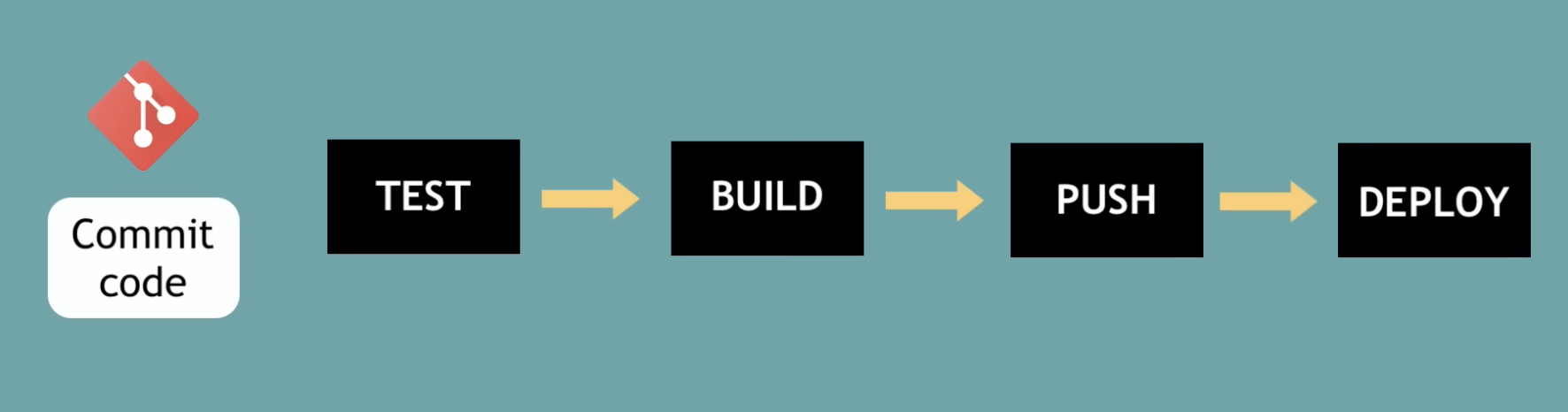
I wasn’t sure at first how that ties into the GitHub Actions pipeline specifically, but the connection is: because each service is already packaged as a self-contained image, GitHub Actions can build, test, and push that exact same image on every commit, and it’s guaranteed to run the same way in CI as it does on my machine. Without containers, “build and test on every commit” would mean provisioning a full guest OS and reinstalling dependencies on every single run. With containers, the pipeline just builds the image once and ships it.
What Is GitHub Actions?

A platform to automate developer workflows. CI/CD is one of these workflows.
What are those workflows? Things developers do that are error-prone or time-consuming enough that they need automation.
In GitHub, for example, there’s adding new contributors, pull requests, and a lot of organizational tasks to manage. A GitHub issue, a pull request, merged code, testing code and building the artifact, and deploying it. Release notes and version numbers. These are all workflows.
GitHub Actions works like this: when something happens in or to a repository (a GitHub event), automated actions are executed in response.
How GitHub Actions Actually Works
- Listen to a GitHub event.
- Sort and label that event into a workflow, maybe a script to assign or reproduce an issue.
- Trigger the workflow.
Why Use GitHub Actions Instead of Third-Party Tools
Using GitHub Actions means using the same tool instead of bolting on a third-party integration.
Setup for the pipeline is easy, it’s a tool built for developers, so you don’t need a dedicated devops engineer just to stand it up.
It integrates with other technologies, so you can combine many different tools, like Java, mapping libraries, Docker, and AWS.
It’s an easy way to get an environment without needing to install any of it yourself. Let’s say I want a Node and Docker environment with a specific version, I can simply connect to the target and deploy.
Next up: actually writing the Dockerfiles, the docker-compose.yml, and the workflow file itself.